
LinkedIn is one of the few channels where business-to-business buyers, operators, founders, executives, and revenue teams all spend time in the same place. That makes it powerful, but also easy to overcomplicate.
The best LinkedIn marketing tool is not always the biggest platform. It is the tool that solves the next bottleneck in your system: finding better ideas, publishing consistently, learning from performance, reaching the right accounts, or proving that the channel is creating sales opportunities.
This guide breaks down 14 LinkedIn marketing tools by the job they are best suited for, plus how to choose the right stack without creating busywork.
Quick summary
If you are starting from scratch, build around these categories:
- Writing help that matches each person: Latitude
- Native sales research: LinkedIn Sales Navigator
- Native paid distribution: LinkedIn Campaign Manager
- Lightweight scheduling: Buffer
- Enterprise social management: Hootsuite
- Social reporting and workflows: Sprout Social
- First-party profile and Page analytics: LinkedIn native analytics
- LinkedIn-first content inspiration: Taplio
- Writing, formatting, and publishing: AuthoredUp
- Tracking which LinkedIn ads lead to sales: Fibbler
- CRM follow-up: HubSpot
- Creative production: Canva
- Relationship management: LeadDelta
- AI-search visibility; vendor-described social monitoring: FancyAI
Most teams do not need all 14. A strong setup helps teams plan content, publish it, review results, and connect relevant responses to sales. One platform may cover several of those jobs, so avoid paying twice for the same features.
How we evaluated these tools
We included tools that were active and publicly documented as of August 18, 2026, solve a distinct LinkedIn marketing job, and give buyers enough information to decide whether each tool fits their process. We reviewed official product and pricing pages for availability, core capabilities, and pricing model.
Latitude is our product, so its description draws on direct product knowledge. The other entries are based on current public documentation rather than one uniform hands-on test. When a detail comes from a vendor or partner and is not independently documented, we attribute it.
Pricing and packaging change. The table below describes the current pricing model, not a guaranteed quote. On smaller screens, swipe horizontally to see the team and pricing columns.
| Tool | Best for | Best-fit team | Pricing model |
|---|---|---|---|
| Latitude | Writing help that matches each person | Founders, operators, and sales and marketing teams | 14-day pilot; paid subscription |
| LinkedIn Sales Navigator | Sales and account research | Sales-led and account-based marketing teams | Paid per license; custom enterprise tier |
| LinkedIn Campaign Manager | Paid LinkedIn distribution | business-to-business demand-generation teams | Campaign-budget model |
| Buffer | Lightweight scheduling | Individuals and small teams | Free plan; paid per channel |
| Hootsuite | Enterprise social management | Teams with several accounts and strict approval rules | Paid per user; custom enterprise tier |
| Sprout Social | Social reporting and workflows | Dedicated social operations teams | Paid per seat; custom enterprise tier |
| LinkedIn native analytics | First-party profile and Page analytics | Individuals and Page admins | Included with LinkedIn |
| Taplio | LinkedIn content inspiration | Individual creators and social sellers | Paid subscription; free trial |
| AuthoredUp | Drafting and formatting | Frequent LinkedIn writers | Paid per connected profile; free trial |
| Fibbler | tracking which LinkedIn ads lead to sales | Teams investing in paid LinkedIn | Paid subscription; free trial |
| HubSpot | CRM follow-up | Revenue teams | Free tools; paid seats and contact tiers |
| Canva | Creative production | Individuals and marketing teams | Free plan; paid individual and team tiers |
| LeadDelta | LinkedIn relationship management | Founders, recruiters, and sales teams | Paid per user; free trial |
| FancyAI | AI-search visibility | Brands and agencies investing in GEO | Paid platform; managed execution tiers |
A note on LinkedIn account safety
Before choosing tools, separate supported publishing and analytics from aggressive automation.
LinkedIn warns against third-party software that scrapes, modifies the LinkedIn experience, or automates activity through bots, extensions, or similar workarounds. That matters because a tool can look productive in the short term while creating account risk in the background.
A safer LinkedIn stack keeps humans in control of strategy, voice, approvals, and relationship-building. Use tools to improve consistency, planning, review, reporting, and follow-up. Be careful with anything that promises mass profile visits, bulk connection requests, automated direct messages, or scraping-based lead lists.
1. Latitude
Best for: founders, operators, and sales and marketing teams that want a way to turn ideas into published posts, match each person's writing style, and review results.
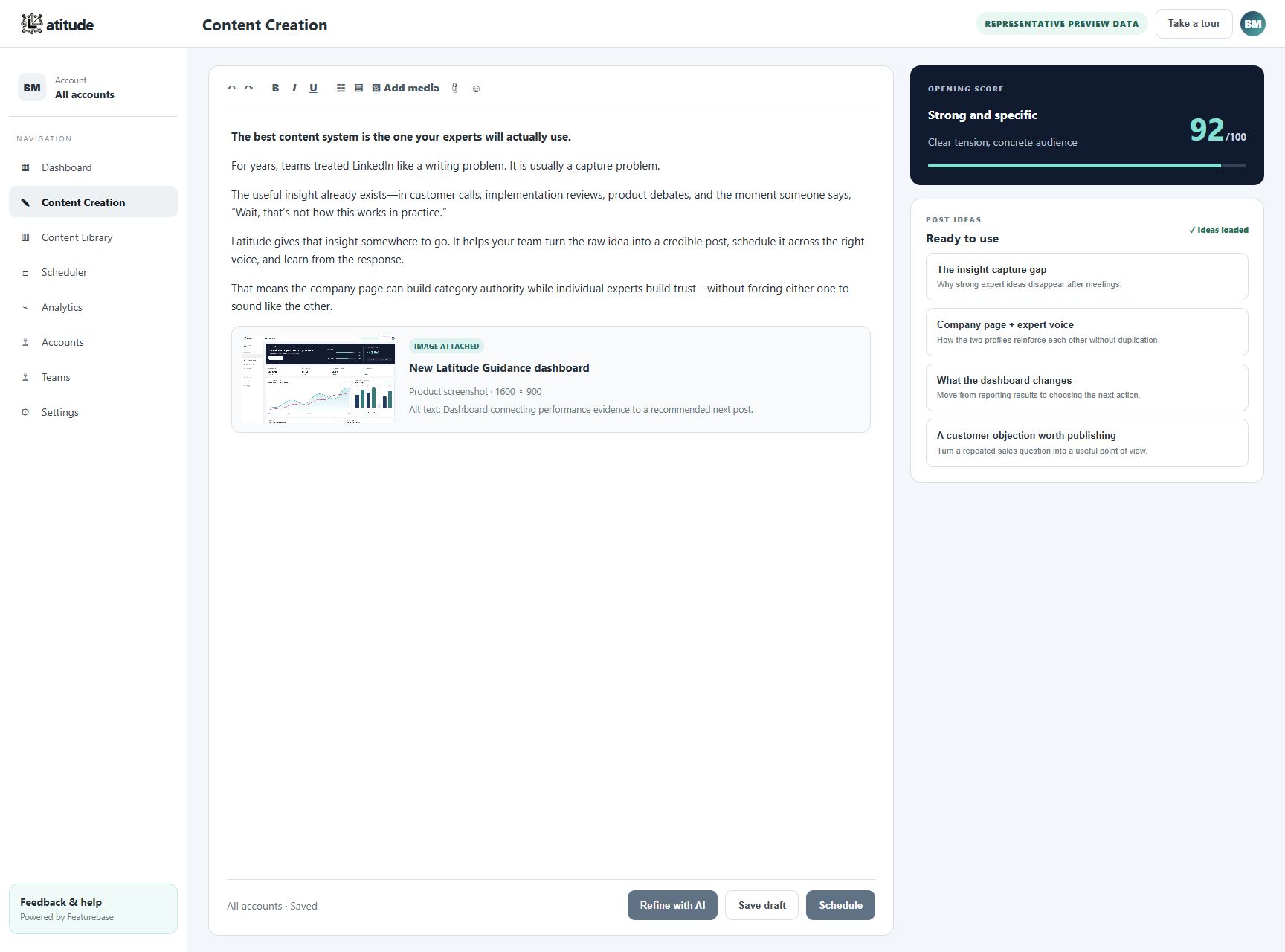
Latitude keeps post ideas, drafting, scheduling, publishing, and results in one LinkedIn-focused workspace. Its writing settings for each profile and reusable content guidance help founders and executives move faster without flattening everyone into the same AI tone.
In the editor, users can review the first lines, preview a post as it will appear on LinkedIn, and either schedule or publish when it is ready. Performance reports cover impressions, reach, reactions, comments, engagement rate, and post-level results, so the next round can build on what actually performed.
Latitude Standard supports up to three connected LinkedIn accounts. Latitude Teams adds shared-profile visibility, all-account scheduling and analytics, and profile-specific strategy for organizations managing several voices.
Latitude uses a secure LinkedIn sign-in connection for connected accounts and does not position itself as engagement or outbound automation. People stay responsible for review, comments, direct messages, and relationship-building. Choose it over a standalone scheduler or editor when the bottleneck spans content quality, consistency, publishing, and learning from performance, not just queueing finished posts.
Good fit for:
- founders, executives, and sales and marketing leaders who want to publish regularly
- business-to-business teams with strong internal expertise but inconsistent output
- agencies and operators managing content across several distinct voices
- teams that want AI assistance without losing voice or human review
Watch out for:
- teams looking only for a generic scheduler for other social networks
- teams that want automated comments, direct messages, connection requests, or other outbound activity
- teams satisfied with occasional native LinkedIn analytics and no repeatable content workflow
2. LinkedIn Sales Navigator
Best for: finding and understanding the right accounts and buyers.
Sales Navigator is LinkedIn's own sales intelligence product. It is strongest when sales and marketing need better account research, saved lead lists, alerts, InMail, and CRM-connected workflows.
For marketers, the value is not just outreach. Sales Navigator can help check audience assumptions, define the target customer more clearly, and give content teams a clearer view of the people they are trying to reach.
Good fit for:
- sales-led business-to-business companies
- account-based marketing programs
- teams that need better lead and account research
- founders validating specific buyer segments
Watch out for:
- smaller teams that only need publishing and analytics
- users who do not have a clear target customer or sales workflow yet
3. LinkedIn Campaign Manager
Best for: paid LinkedIn distribution.
Campaign Manager is the native tool for running LinkedIn ads. If your company is using Sponsored Content, Lead Gen Forms, retargeting, or account-based paid campaigns, this is the control center.
The advantage is native access to LinkedIn's ad targeting and campaign setup. The tradeoff is that you may need your CRM or another reporting tool if you want to connect ad activity to revenue.
Good fit for:
- business-to-business teams running paid demand generation
- marketers targeting specific job titles, industries, or account lists
- companies promoting high-value offers, webinars, reports, or demos
Watch out for:
- teams that cannot yet measure conversion quality
- campaigns without a strong follow-up process after form fills or clicks
4. Buffer
Best for: lightweight scheduling and cross-channel planning.
Buffer is a practical choice when you want a clean publishing calendar without buying a heavy enterprise suite. It supports LinkedIn profiles and pages, and it is useful for planning posts ahead of time, reviewing queued content, and keeping a simple posting schedule.
Good fit for:
- small teams
- solo operators
- founders who want a simple publishing workflow
- marketers managing LinkedIn alongside a few other social channels
Watch out for:
- advanced approval workflows
- complex enterprise reporting needs
5. Hootsuite
Best for: enterprise social management.
Hootsuite is a broader social media management platform that works well when LinkedIn is one of several channels. It brings scheduling, inbox workflows, analytics, approval processes, and team collaboration into one place.
For LinkedIn specifically, it is useful when a company needs clear rules for who can publish, who approves posts, and how social activity gets reported across multiple accounts.
Good fit for:
- larger teams
- companies managing many social accounts
- teams with approval requirements
- organizations that want LinkedIn reporting next to other social channels
Watch out for:
- teams that only need LinkedIn-specific content help
- small teams sensitive to platform cost or complexity
6. Sprout Social
Best for: reporting, engagement, and social operations.
Sprout Social is another full social management platform, with a strong emphasis on reporting, inbox management, team workflows, and analytics. It is especially useful when social media is already an established team responsibility rather than a side project.
For LinkedIn, Sprout helps teams move beyond posting into performance review, audience reporting, approval workflows, and customer engagement.
Good fit for:
- marketing teams with dedicated social operators
- companies that need structured reporting
- teams managing comments, messages, and engagement at scale
- organizations that want approval controls for publishing
Watch out for:
- early-stage teams that only need a focused LinkedIn workflow
- operators who want a lightweight personal-brand tool
7. LinkedIn native analytics
Best for: free, first-party analytics for personal content and company Pages.
LinkedIn native analytics gives every member access to individual and combined post analytics, including impressions, engagements, audience trends, and top-performing posts. Page admins also get content, follower, visitor, search-appearance, competitor, and newsletter analytics.
Because the data stays inside LinkedIn, native analytics is the safest baseline for checking performance before adding another reporting layer. Members and Page admins can export supported reports for deeper analysis.
Good fit for:
- individuals who want a free performance baseline
- Page admins reviewing company content and audience trends
- teams validating which metrics they actually need
- buyers who want to minimize third-party data-access risk
Watch out for:
- manual reporting across multiple profiles or Pages
- limited approval and content-planning workflows
- teams that need a way to connect CRM sales results to posts or combine client reports
8. Taplio
Best for: LinkedIn post ideas and publishing support.
Taplio is built around LinkedIn content creation, scheduling, and performance. It is often used by founders, creators, and sales professionals who want ideas, opening lines, scheduling, and analytics in one LinkedIn-focused workspace.
It can be useful when the main problem is difficulty getting started. The risk is that teams can start to sound like everyone else if they rely too heavily on templates and viral post patterns.
Good fit for:
- individual creators
- founders building a personal brand
- sales teams using content as part of social selling
- users who want LinkedIn-specific inspiration
Watch out for:
- generic AI output
- teams that need a deeper voice and review system
9. AuthoredUp
Best for: drafting, formatting, and improving posts before publishing.
AuthoredUp is useful for people who write directly for LinkedIn and want a better editor, preview, formatting controls, opening lines, drafts, snippets, and analytics around their posts.
It helps people write, format, and publish posts more easily. It does not replace a clear content plan.
Good fit for:
- creators who write frequently
- operators who care about formatting and previewing posts
- people repurposing older LinkedIn posts
- teams that want simple creator analytics
Watch out for:
- companies that need several reviewers and clear brand approval rules
- teams that need CRM or sales opportunity reporting
10. Fibbler
Best for: tracking which LinkedIn ads lead to sales.
Fibbler is focused on helping business-to-business teams understand which companies engage with LinkedIn Ads and how that engagement connects to sales opportunities and revenue. That is a different job than scheduling posts or writing content.
If you are spending meaningfully on LinkedIn Ads, tracking sales results becomes important quickly. Clicks and form fills do not always explain whether the right accounts are seeing your campaigns or whether sales should follow up.
Good fit for:
- business-to-business teams investing in LinkedIn Ads
- companies running account-based campaigns
- marketers who need to connect ad engagement to sales opportunities
- teams using HubSpot, Salesforce, or similar CRMs
Watch out for:
- teams focused only on organic content
- companies without enough paid LinkedIn activity to justify another reporting tool
11. HubSpot
Best for: CRM follow-up and lead management.
HubSpot is not a LinkedIn-only tool, but many teams use it to record LinkedIn contacts, ad forms, email follow-up, and campaign results.
For LinkedIn marketing, HubSpot is most useful when it connects channel activity to actual contacts, companies, deals, and follow-up workflows. That helps sales follow up and lets the team measure results from LinkedIn.
Good fit for:
- teams already using HubSpot CRM
- companies running LinkedIn Lead Gen Forms
- marketers who need to see which LinkedIn contacts become sales opportunities
- revenue teams that want follow-up workflows after LinkedIn engagement
Watch out for:
- teams that only need simple posting
- teams without accurate CRM data
12. Canva
Best for: fast LinkedIn creative.
Canva is useful for turning ideas into carousels, simple graphics, quote cards, report snippets, and event promotion assets. LinkedIn is still text-heavy, but strong visuals can help explain complex points and make posts easier to remember.
The best use of Canva is not decoration. It is clarity: charts, frameworks, checklists, product screenshots, and visual summaries.
Good fit for:
- marketers creating carousels or simple graphics
- founders turning frameworks into visuals
- teams that need fast design without waiting on a designer
- content repurposing from webinars, reports, or decks
Watch out for:
- generic templates that make the brand look interchangeable
- visuals that add polish but no useful information
13. LeadDelta
Best for: managing LinkedIn relationships.
LeadDelta helps people organize, tag, filter, and manage LinkedIn connections. That can be valuable when LinkedIn is not just a publishing channel, but also a relationship database.
For founders, sales leaders, recruiters, and community-driven teams, the challenge is often remembering who matters, when to follow up, and how relationships are developing over time.
Good fit for:
- relationship-driven founders
- recruiters and sales operators
- community builders
- people with large LinkedIn networks that need organization
Watch out for:
- teams expecting full CRM replacement
- users who have not defined a relationship workflow
14. FancyAI
Best for: AI-search visibility, citation building, authority building, and real-time engagement opportunities.
FancyAI positions itself as a Generative Engine Optimization platform that helps companies improve how they are understood, cited, and recommended across AI-powered search engines.
FancyAI describes its proprietary AI Readiness Index as a 0–100 measure of entity clarity, citation authority, structured proof, and corroborating mentions. Its platform then recommends actions intended to improve citation coverage, competitive share of voice, and recommendation visibility across major AI systems.
FancyAI-provided product information also describes a LinkedIn social-monitoring feature that surfaces relevant posts, mentions, and industry conversations in real time. Buyers should confirm the feature's current plan availability and LinkedIn data-access model during evaluation.
Good fit for:
- companies improving AI-search visibility
- brands trying to influence research and purchasing decisions
- marketing teams focused on citations and authority
- sales and marketing teams looking for relevant LinkedIn conversations
- agencies offering GEO, content, social media, or AI-visibility services
Watch out for:
- teams primarily looking for LinkedIn content scheduling
- companies seeking fully automated outbound sequencing or CRM prospecting
- buyers who have not confirmed the LinkedIn-monitoring scope and access model
How to choose the right LinkedIn marketing stack
Do not start by asking which tool has the most features. Start with the problem you need to solve.
If you cannot publish consistently, start with Latitude. Add a separate scheduler only if you need to publish on other social networks.
If you cannot tell what content works, start with LinkedIn native analytics, then add a reporting layer like Sprout Social when the workflow requires it.
If sales does not know who to reach, add Sales Navigator and a clear CRM workflow.
If paid LinkedIn is running but the effect on sales opportunities is unclear, use Fibbler or your CRM to connect the ads to sales results.
If content looks plain or hard to understand, add Canva for frameworks, carousels, and simple visual assets.
If AI-search visibility is the gap, evaluate FancyAI as a GEO platform. If live market conversations are the gap, confirm its current LinkedIn-monitoring scope before buying.
A practical LinkedIn stack should make three things easier:
- create better ideas
- publish more easily
- learn what deserves more investment
When a tool adds more dashboards than decisions, it is probably not helping.
Ready to make publishing easier?
If your team struggles to turn executive or founder expertise into consistent LinkedIn posts, Latitude can help you plan, draft, schedule, and review performance for up to three connected LinkedIn accounts without entering a credit card.
Start your 14-day Latitude pilot →
The bottom line
The best LinkedIn marketing tools are the ones that protect the quality of your message while improving the reliability of your system.
For most business-to-business teams, that means combining a regular posting routine, a safe publishing workflow, useful analytics, and a clear path from engagement to sales follow-up.
Start small. Fix the bottleneck in front of you. Then add tools only when the workflow is ready for them.