
Shield is winding down, and that leaves a real gap for teams that relied on it for LinkedIn analytics.
But the question is not just "what looks most like Shield?"
The better question is: what LinkedIn analytics process will keep working when LinkedIn changes or enforces its rules?
Shield's shutdown is a reminder that LinkedIn analytics is not only a dashboard problem. It is an access problem, a trust problem, and a workflow problem.
If you are replacing Shield, start by preserving your historical data. Then evaluate your next tool based on how it gets data, what it can legitimately access, and whether it helps your team use the results.
Shield's public LinkedIn update says Google and LinkedIn made it clear that Shield could not keep operating the way it was built. In an earlier post, Shield's co-founder also said Google had taken down the Chrome extension that connected Shield to LinkedIn.
We do not know the private legal details. We should not pretend we do.
But the operational lesson is clear: if a LinkedIn analytics tool depends on a platform tolerating an unofficial access path, the customer is not just buying reporting. The customer is inheriting platform-access risk.
Quick comparison: which Shield alternative should you choose?
| Need | Best option | Why | Limitation |
|---|---|---|---|
| Basic personal analytics | LinkedIn native analytics | Free and official | Manual, limited workflow, harder to turn into a team routine |
| Publishing, scheduling, and post-level analytics | Latitude | Connects content execution with analytics review | Best fit when you need workflow, not just raw charts |
| Analytics accessible through AI or internal workflows | Latitude MCP | Lets approved AI and operations workflows draft, schedule, retrieve analytics, and summarize performance through Latitude | Requires a connected-account Latitude workflow |
| Several social channels and strict approval needs | Enterprise social suite | Broad multi-channel reporting and approval workflows | Often heavier and more expensive than a LinkedIn-focused team needs |
| Writing help for a solo creator | Creator writing tool | Useful for drafting, formatting, and content organization | Usually not a full analytics or team workflow replacement |
| Automated direct messages, likes, comments, scraping, or profile visits | Avoid this category | Short-term automation can create platform and account risk | It is the wrong replacement path for Shield users |
The important distinction: Latitude is not trying to be a one-for-one clone of Shield. Latitude is a broader LinkedIn workspace for teams that want analytics connected to publishing, scheduling, content review, and follow-up content decisions.
That makes Latitude a strong fit if Shield was part of a team workflow. If Shield was only a place where one person checked charts once a month, native LinkedIn analytics may be enough.
What changed
Shield helped a lot of people understand their LinkedIn content. That is worth acknowledging. Many creators and teams used it because LinkedIn's native analytics were not enough for the way they worked.
The problem is that private platform data is not the same as a normal website page. Post impressions, profile-level history, audience patterns, and authenticated account metrics sit behind platform controls. When a third-party product builds around browser extensions, scraping, session workarounds, or other unofficial paths, the product can work for a long time and still be fragile.
LinkedIn is explicit about this category of risk. Its own help center says LinkedIn does not permit third-party software, including bots, crawlers, browser plug-ins, or extensions, that scrape, modify, or automate activity on LinkedIn's website: LinkedIn prohibited software and extensions.
That does not mean every third-party LinkedIn tool is unsafe. It means the access model matters.
The risk many teams were really buying
When a tool pulls LinkedIn data through a path the platform can shut down, the tool may feel like it is solving the analytics problem. In reality, it is also absorbing platform risk on the customer's behalf.
That risk can show up as:
- missing syncs
- broken Chrome extensions
- account warnings
- reporting gaps
- sudden product shutdowns
- lost historical workflows
- no clear migration path
This is why the Shield news matters beyond Shield. The broader market lesson is that LinkedIn analytics software should be judged by how it gets data, not only by how good the dashboard looks.
What Shield users should do this week
If your team used Shield, start with preservation before replacement.
- Export the data you can still access.
- Save reports that leadership, customers, or clients already depend on.
- List every LinkedIn profile or page connected to the old workflow.
- Identify which metrics are actually decision-critical.
- Separate personal-profile analytics from company-page analytics.
- Document which reports were used for content planning, client reporting, or revenue review.
- Choose a replacement based on access model, not feature screenshots.
The last point is the most important. Do not replace one fragile workflow with another fragile workflow just because the charts look familiar.
Analytics replacement versus workflow replacement
Shield was primarily an analytics product. Latitude is broader.
That difference matters. If your team only needs a place to look up a few native metrics manually, Latitude may be more workflow than you need. If your team wants analytics connected to planning, drafting, approvals, scheduling, and reviewing results, a broader workspace can be more useful than another standalone dashboard.
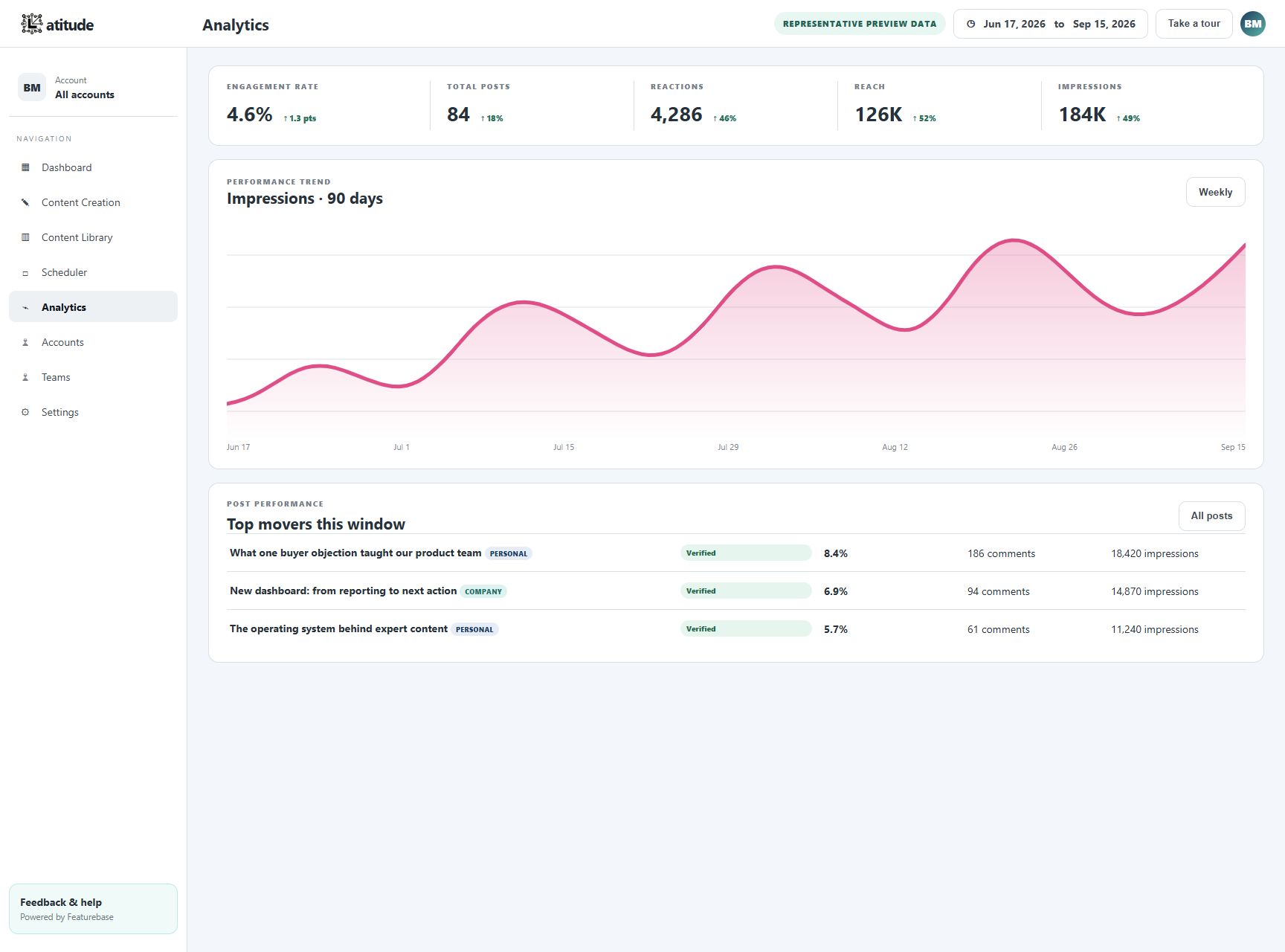
In Latitude, the analytics workflow is meant to support decisions like:
- which topics should we post about again?
- which posts earned reach, impressions, reactions, comments, or engagement?
- which approved posts are scheduled or already published?
- which profile or page needs attention?
- what should the next draft learn from recent performance?
That is the replacement question former Shield users should ask: do we need analytics by itself, or do we need analytics tied to the next publishing action?
What a safer LinkedIn analytics replacement should do
A better replacement should be clear about what it can access and how it accesses it.
Look for a tool that:
- connects accounts through an authenticated product workflow
- uses LinkedIn-permissioned access where available
- can publish and schedule without asking for browser-session workarounds
- shows post-level analytics that are actually available to the connected account
- says clearly when a metric is unavailable instead of inventing a proxy
- keeps human approval in the publishing loop
- avoids automated direct messages, fake engagement, scraping, and cookie-based access
- gives teams a way to work from systems outside the UI without bypassing platform rules
The honest version of LinkedIn analytics is not "we can get every hidden metric forever." The honest version is "we can help you use the data your connected account can legitimately access, and we will make the workflow useful around that."
Where Latitude fits
Latitude is a strong fit for business-to-business teams, agencies, founders, and operators who used Shield as part of a larger LinkedIn routine, not just as a monthly reporting screen.
With Latitude, teams can:
- draft LinkedIn posts from real founder, executive, or operator insight
- schedule approved posts
- review post-level performance
- track reach, impressions, reactions, comments, engagement rate, and post history where available
- manage content across connected profile and page contexts
- turn performance summaries into the next round of content briefs
- use automation for publishing tasks while keeping people responsible for relationships
You can also try Latitude before making a larger platform decision. Latitude offers free pilot access with no credit card required, so a team replacing Shield can connect, draft, schedule, and review analytics before deciding whether the workflow fits.
The newer Latitude MCP path matters here too.
For teams that do not want to live in another dashboard, MCP can make Latitude available to approved AI and operations workflows. That means a team can ask an assistant to help draft, schedule, retrieve LinkedIn analytics, or summarize performance through Latitude instead of relying on a browser extension to imitate a person using LinkedIn.
That creates a different commercial model as well. If a customer mostly wants access through software integrations, analytics retrieval, scheduling, and reporting through MCP rather than heavy UI usage, a lighter licensing model may make sense. The important part is that the workflow runs through Latitude's connected-account model instead of a fragile connection that imitates user activity.
Who should not use Latitude?
Latitude may not be the right fit if:
- you only need to check your own LinkedIn analytics once a month
- you need multi-network social listening across many public channels
- you want aggressive engagement automation, automated direct messages, profile visits, likes, or comments
- you are looking for a raw analytics warehouse rather than a publishing and content workflow
- you do not want to connect a LinkedIn account through a product workflow
In those cases, native LinkedIn analytics, an enterprise social suite, or a different category may be a better fit. That honesty matters because the wrong replacement can recreate the same fragility Shield users are trying to leave behind.
FAQ: Shield alternatives and LinkedIn analytics
What is the best Shield alternative for LinkedIn analytics?
The best Shield alternative depends on the job. For business-to-business teams that need LinkedIn analytics plus publishing, scheduling, content review, and MCP access, Latitude is a strong fit. Teams can start with free pilot access and no credit card required. For individuals who only need occasional manual checks, native LinkedIn analytics may be enough.
Can Latitude replace Shield?
Latitude can replace the workflow many teams used Shield for: understanding post performance, planning better content, scheduling approved posts, and turning analytics into the next group of posts. It is not trying to recreate every hidden or unavailable metric. It focuses on useful analytics around the data a connected account can legitimately access.
Why does MCP matter for former Shield users?
MCP matters because some teams do not want another dashboard to check every day. They want an approved AI or operations workflow to help draft posts, schedule content, retrieve analytics, and summarize performance. Latitude MCP gives that workflow a cleaner system path.
Should Shield users choose another browser extension?
Be careful. Browser extensions can be useful, but an analytics workflow that depends on reading or modifying LinkedIn pages can carry platform-access risk. Ask any replacement vendor how data is accessed, what happens if the access path changes, and whether the workflow depends on session workarounds.
Bottom line
Shield winding down is a reminder that LinkedIn analytics is not just a dashboard problem. It is an access, trust, and workflow problem.
If you relied on Shield, preserve your historical data first. Then choose the next system based on how it connects, what it can legitimately retrieve, and whether it helps your team act on the data.
Latitude can help teams keep publishing, scheduling, and reviewing LinkedIn analytics through a more durable workflow. And for teams that want analytics and publishing access through AI or operations systems instead of another daily UI, Latitude's MCP path gives them a cleaner way to work.
Try Latitude without a credit card if you are replacing Shield and need a safer LinkedIn analytics workflow. Talk with us if you want help mapping the migration.