If you're thinking about canceling, that's completely fair.
Most people who feel this way early on haven't done anything wrong - they just haven't hit the moment where Latitude starts working for them yet.
This usually takes just a few minutes to fix.
Quick checklist (start here)
Did you complete your Content Strategy?
- Did you schedule or publish any posts yet?
- Did you review the first 5 posts Latitude created for you?
If not, you're likely one small step away from seeing value.
The most common early mistakes
These are the top reasons people feel like Latitude "isn't working":
- Creating posts but never scheduling or publishing them
- Skipping the Content Strategy setup
- Not realizing Latitude already created posts for them to review
Until these steps happen, the product doesn't really get a chance to work.
What "good usage" actually looks like
You don't need to do a lot - just the right things:
- Complete your Content Strategy
- Review and refine your first set of posts
- Schedule or publish your content
- Let Latitude start learning from your activity
Once you do this, the experience changes quickly.
Two quick wins (takes ~5 minutes)
If you want to give Latitude a real shot before canceling, try this:
1. Schedule your first posts
Go to your Content Strategy -> Launch step
- Review your posts
- Click Auto-schedule all
You'll instantly have content planned and ready to go.
2. Publish one post
Open any draft
- Make a quick edit if needed
- Click Post to LinkedIn
That first post is what unlocks:
- Better recommendations
- More personalized suggestions
- Analytics on your content
A quick note on results
Latitude helps you stay consistent - and consistency is what drives results on LinkedIn.
If you want deeper, real-time performance data, we recommend checking LinkedIn directly while we continue refining analytics inside Latitude.
If you don't want to do this yourself
That's completely okay too.
Latitude offers managed services, where a content writer can:
- Create posts for you
- Match your voice
- Handle scheduling
So you still get the benefits without doing the work.
How to cancel (if you still want to)
If you decide Latitude isn't the right fit, you can cancel anytime:
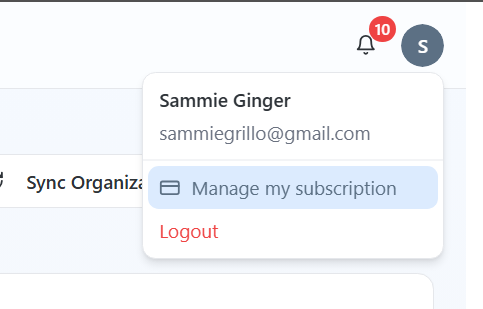
Click your profile icon in the top-right
- Select Manage my subscription
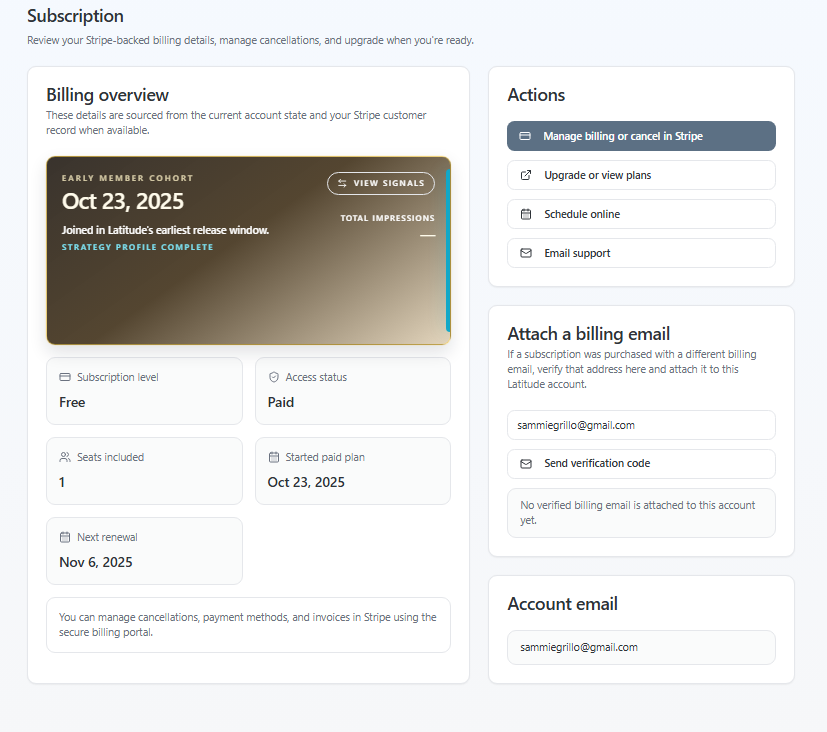
- Click Manage billing or cancel in Stripe
One thing to consider
Most people don't need more tools - they need a system that actually gets them to post.
Latitude is built to do that with you, not just give you a blank page.
If you try the quick steps above and it still doesn't click, that's totally okay - but it's worth seeing what happens once your first post goes out.
If you're on the fence, support is always here to help you get unstuck quickly.
Screenshots if needed