Delegation is available for specific plans and configurations.
Quick checklist (start here)
Do you see "Share Access" in the Accounts tab?
- Are you on a plan that includes delegation (Services or enabled account)?
- Are you entering the email of a Latitude user?
If not, that's likely why it's not working.
Who can delegate access
Delegation is not available on all accounts by default.
You can delegate access if:
- You are on a Services-enabled plan, or
- Your account has been enabled for delegation
If you don't currently have access:
You can contact support to enable it for your account
- Delegation can be added for internal teams or small-scale collaboration
- White-label options are also available for larger use cases
How to check if delegation is enabled
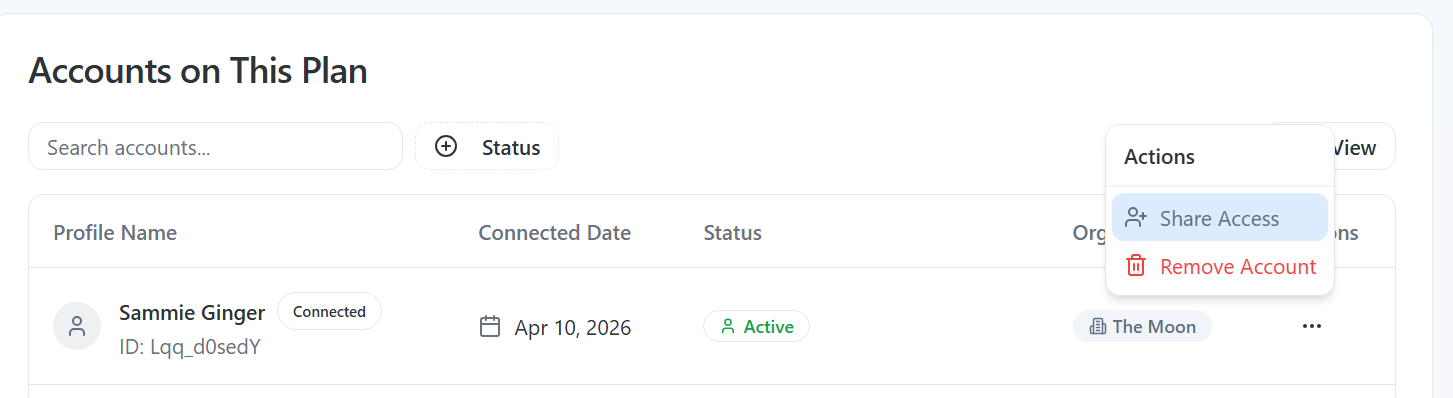
Go to Accounts
- Find your LinkedIn account
- Click the ••• (Actions) menu
- Look for "Share Access"
If you see it -> delegation is enabled
If you don't -> your account isn't enabled yet
How to delegate access
Once enabled, you can grant access in a few steps:
- Go to Accounts
- Click the ••• (Actions) menu next to your account
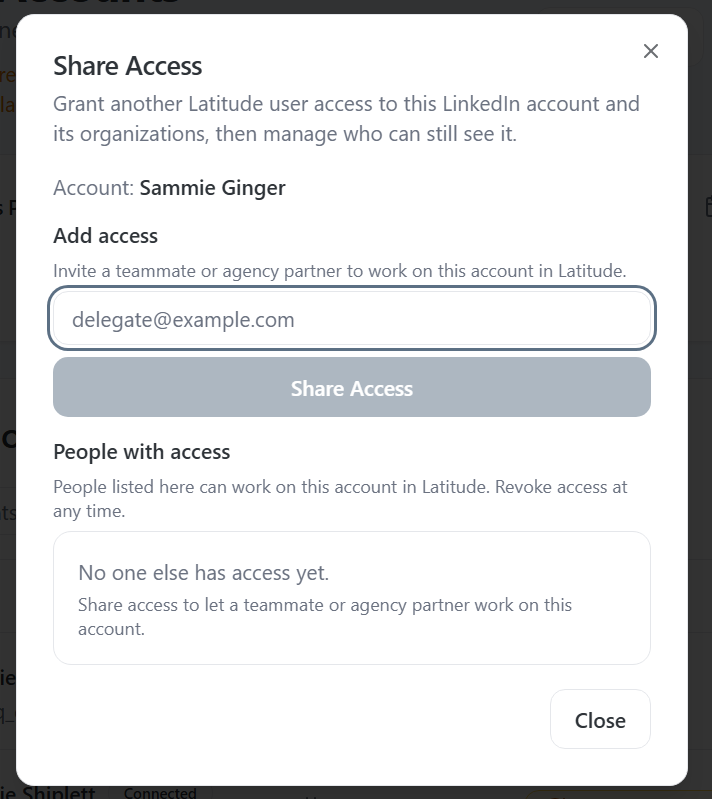
- Select Share Access
- Enter the email of the Latitude user you want to add
- Click Share Access
They'll now be able to work on that LinkedIn account in Latitude.
What delegated users can do
Users with access can:
- Create and edit posts
- Schedule content
- View analytics
This allows you to collaborate without sharing login credentials.
Common issues (and how to fix them)
You don't see "Share Access"
Your account isn't enabled for delegation
Fix:
- Contact support to enable it or upgrade your plan
The email doesn't work
The person must already have a Latitude account
The email must match their Latitude login
You're trying to delegate the wrong account
Make sure you're selecting the correct LinkedIn account from the Accounts tab
How to remove access
You can revoke access at any time:
- Go to Accounts
- Click Share Access
- Remove the user from the access list
Changes take effect immediately.
One thing to remember
Delegation is designed for specific workflows and plans, not general team access.
If you don't see the option, it's not broken - it just needs to be enabled.
Need access to this feature?
If you're looking to:
Delegate access within your organization
- Work with a small team
- Or explore white-label options
Reach out to support and we'll help you get set up.
Screenshots if needed