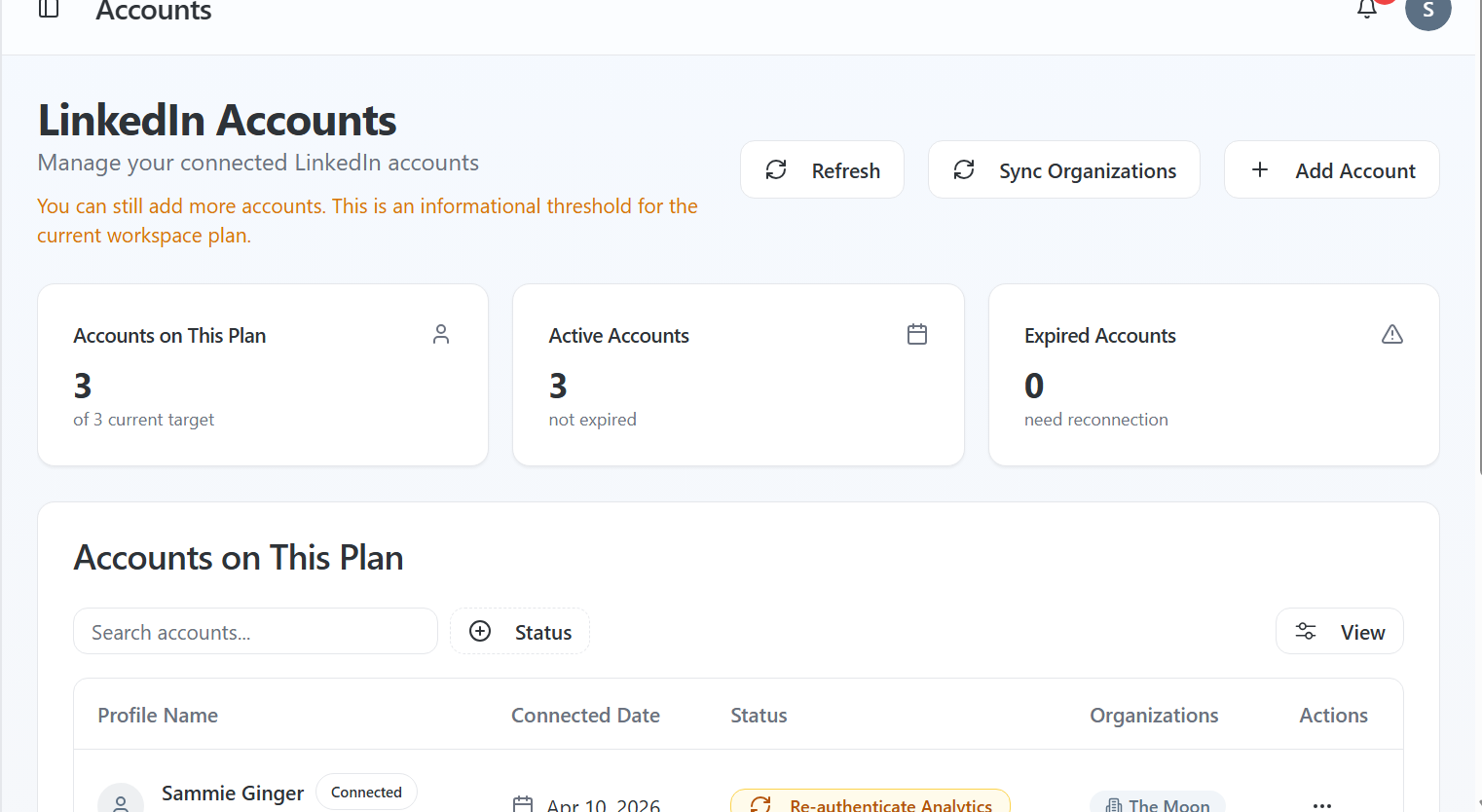
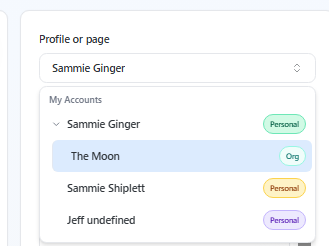
Once everything is set up correctly, your company page will appear alongside your personal profile.
Quick checklist (start here)
Are you a Content Admin of the LinkedIn page?
- Did you connect the correct LinkedIn account?
- Did you click Allow during the LinkedIn permission step?
- Did you click Sync Organizations in the Accounts tab?
If any of these are off, your page won't appear.
How to add your Company Page
Company pages are connected through your LinkedIn account.
To add your page:
- Go to Accounts
- Click Add Organization
- Select the LinkedIn account that manages the page
- Click Allow on the LinkedIn permissions screen
- Return to Latitude and confirm the page appears under that account
Once connected, your company page will show as an option when creating a post.
How to select your Company Page when posting
After connecting your page:
- Go to Content Creation or Scheduler
- Open the profile/page dropdown
- Expand your LinkedIn account
- Select your company page (labeled as "Org")
You'll now be posting as the company instead of your personal profile.
Most common issues (and how to fix them)
Your page isn't showing up
This is usually one of three things:
1. You're not a Content Admin
You must have Content Admin (or higher) access on LinkedIn
If not, the page won't appear at all
2. Wrong LinkedIn account is connected
You may manage the page from LinkedIn Account A
- But connected LinkedIn Account B in Latitude
Fix:
- Log out of LinkedIn
- Reconnect using the correct account
- Or add the correct account in Latitude
3. Permissions weren't granted
If you didn't click Allow during setup, Latitude can't access your pages
Fix:
- Reconnect and accept permissions
Your page used to show, but doesn't anymore
This usually means permissions need to be refreshed.
Fix:
- Go to Accounts
- Click Sync Organizations
- Refresh the page
This will pull in any pages tied to your LinkedIn account again.
Why this happens
Latitude relies on LinkedIn to tell it which pages you have access to.
If:
- You're not an admin
- You're logged into the wrong account
- Or permissions weren't granted
LinkedIn simply won't return that page - so it won't appear in Latitude.
One thing to remember
Your company page is tied to your LinkedIn account, not Latitude directly.
If it doesn't show up, it's almost always a permissions or account mismatch - not a broken feature.
Still not seeing your page?
Try:
- Logging out of LinkedIn and reconnecting
- Clicking Sync Organizations
- Confirming your admin role on LinkedIn
If it still doesn't appear, support can help you track it down quickly.
Screenshots if needed